Introduction
NOTE: I am in the United Kingdom – heating systems and boilers may operate differently in other countries.
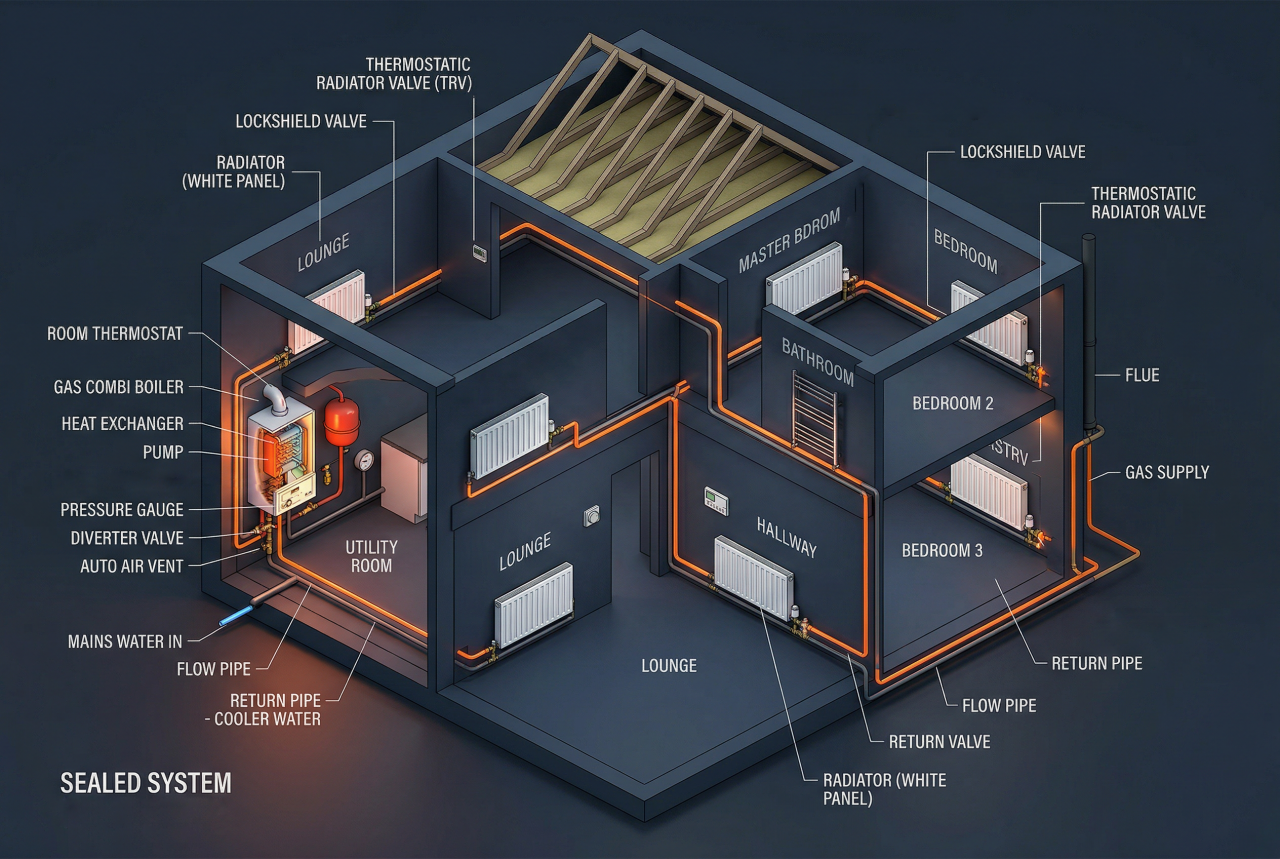
I’ve been using Hive for over a decade, and while it was impressive when it launched, it’s no longer ideal for a larger home by today’s standards, and has the following key limitations:
- It treats the entire house as a single heating zone.
- It cannot detect when one room is colder than the others or heat that room independently.
- It has no zone scheduling to heat different areas of the home at different times.
- It offers no way to set individual rooms to their own target temperatures.
These shortcomings became the core requirements for the new heating system I’ve now successfully built in Home Assistant.
After discovering Shelly’s BLU TRVs (thermostatic radiator valves), I decided to install them on most of my radiators and integrate the heating control into Home Assistant.
History
From the 1950s to the early 2000s, most homes used a single wall thermostat and manually balanced radiators, an approach that treated the whole house as one thermal zone.
TRVs became common from the late 1970s and lockshield balancing matured through the 1980s–1990s, giving rooms basic individual control, but the system still relied on one sensor whose placement, drafts, sunlight, or poor balancing could easily destabilise the whole house.
As homes changed – with new insulation, windows, and radiator upgrades – these systems often needed rebalancing and still wasted energy by overheating some rooms while under‑heating others. Platforms like Hive modernised the single‑zone model with digital scheduling and remote control, but didn’t change how heat was distributed.
Today’s expectations of per‑room control, multiple sensors, proper balancing, and smarter logic go far beyond what the old single‑thermostat architecture was ever designed to handle.
Shelly BLU TRVs
I chose Shelly BLU TRVs (thermostatic radiator valves) because the rest of my home automation landscape is already Shelly, and their ecosystem aligns with my preferences while integrating cleanly with Home Assistant.

They are excellent for giving Home Assistant control over individual radiators, but they do come with a few drawbacks:
- They rely on Bluetooth to talk to a Wi‑Fi gateway, which makes them vulnerable to interference and missed messages.
- They use alkaline batteries, so they need periodic replacements.
- They assume a proportional relationship between valve opening and heating performance, rendering PID valve modulation ineffective.
- They don’t communicate with each other and rely on an external controller, such as Home Assistant, to coordinate their behaviour.
However, their core capability is fundamental to this project as it lets me control the heat going to each individual radiator and get accurate temperature feedback from that specific room. This functionality forms the foundation of my requirements for the new heating system.
The TRV has two modes of operation: it can operate as a TRV with PID control of the valve according to it’s internal or an external temperature sensor, or as a simple remote control valve.
Heating System Theory
In a TRV review video I watched, a heating engineer highlighted several critical factors that have to be considered when designing effective heating control, which prompted further research.
Boiler Operation
In the UK, most homes are heated using gas boilers, which supply hot water to radiators throughout the house. These boilers are typically controlled by a relay (as with Hive), switching the boiler on when heat is demanded.
Modern boilers modulate their burner output to maintain a stable flow temperature, but they still require a minimum water flow rate to operate correctly.
Two key conditions while operating the boiler must be avoided, dead-heading and short-cycling:
Dead-Heading
When the boiler fires, the pump circulates water through the radiator circuit. It’s therefore essential that not all radiators are shut off at the same time. If the pump has nowhere to push the water, the system becomes “dead‑headed,” which can damage the pump, cause overheating, and trigger boiler lockouts.
To prevent dead‑heading, at least one radiator (often a towel rail) is usually left without a TRV so it always remains open.
Short-Cycling
Short‑cycling is harmful because it forces the boiler to switch on and off repeatedly, wasting energy, increasing wear on components, and reducing the overall lifespan of the system.
Short cycling wastes energy, because the system’s thermal inertia prevents the boiler and radiators from reaching efficient operating temperature before shutting off.
Radiator Operation
Radiators have a fixed maximum heat output. They heat up until they reach saturation, the point where the entire radiator surface is fully hot and able to sustain that maximum heat output.
Radiators require a certain minimum flow‑rate to reach saturation, and this threshold is usually well below the maximum possible flow through the valve. Increasing flow‑rate reduces the time it takes for the radiator to reach saturation, but once saturated, any flow above the ‘holding’ level does not increase the radiator’s heat output
Radiator Valves
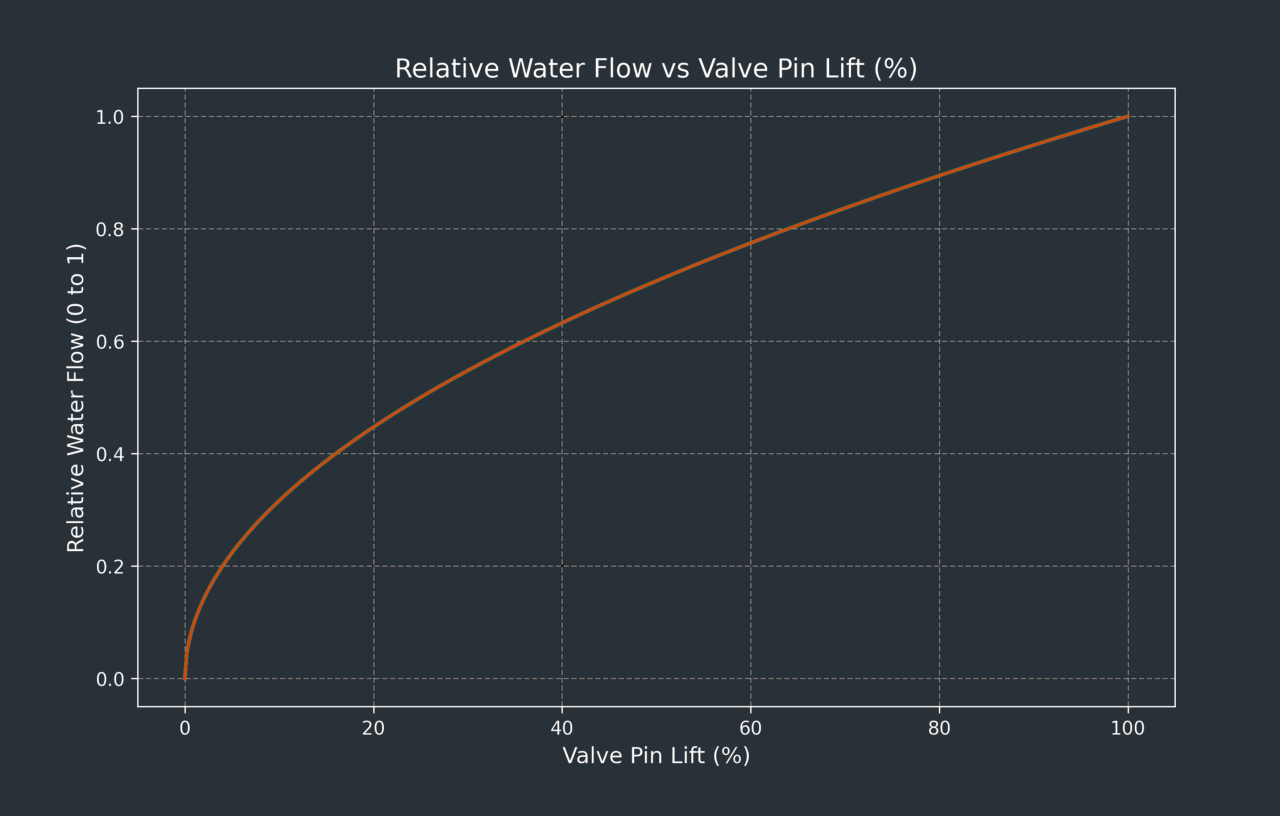
Radiators have two valves: the TRV valve and the lockshield valve. It is important to note that most TRV valves are non‑linear, and operates similarly to an old‑fashioned globe‑type water tap: opening the valve a small amount allows a large amount of water through, while opening it the rest of the way only increases flow by a minimal amount.
The lockshield valve is used to balance the system by controlling the flow rate through each radiator. Because some radiators are closer to the boiler, and some are on upper floors, each one experiences different ‘resistance’ to water flow. When the boiler pump circulates hot water around the system, certain radiators will naturally receive more flow than others. Adjusting the lockshield valves ensure that every radiator receives an appropriate share of hot water.
In a per‑room heating configuration, the lockshield valve can be used to slow a radiator’s warm‑up rate so it better matches the room’s thermal response and reduces temperature overshoot.
The chart below shows how quickly the study heats up when the boiler fires. Although the study is better insulated than the rest of the house (see the Garage Conversion project), its radiator is by far the closest to the boiler and therefore receives the hottest water.
The study target temperature is set to 21.5°C as shown by the red line:
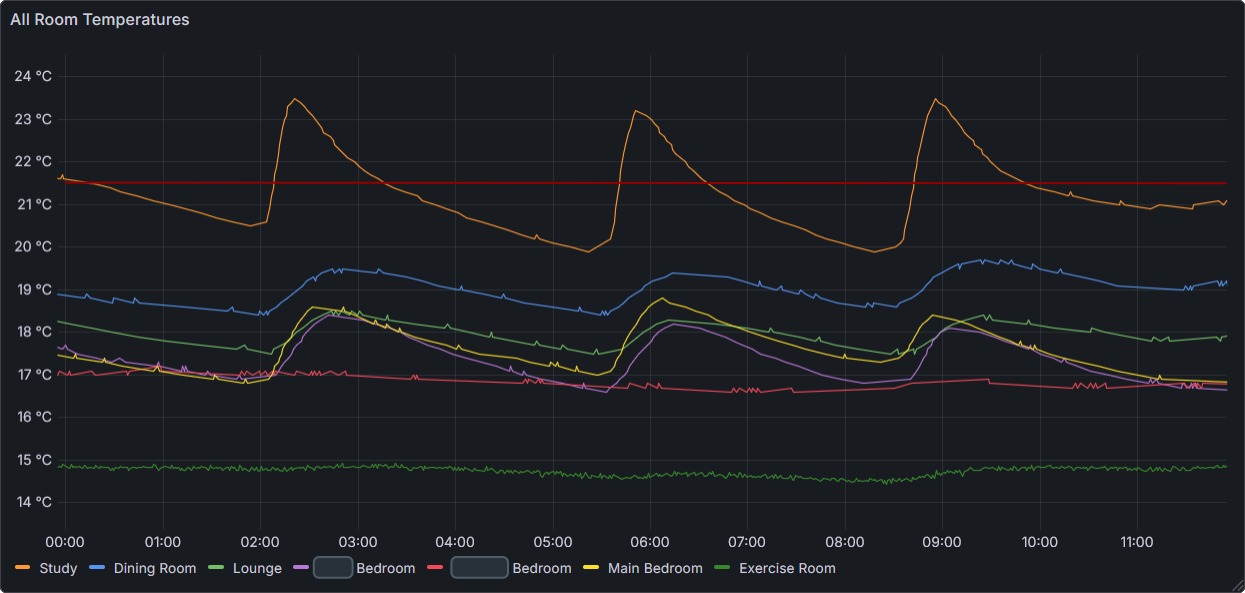
You may notice that the study cools faster than the other rooms, even though it’s better insulated. This happens because it starts at a higher temperature, so it loses heat more rapidly. With the door open to the dining room and the rest of the house, additional heat also escapes into those cooler spaces.
Limitations of PID Control in Radiator Heating
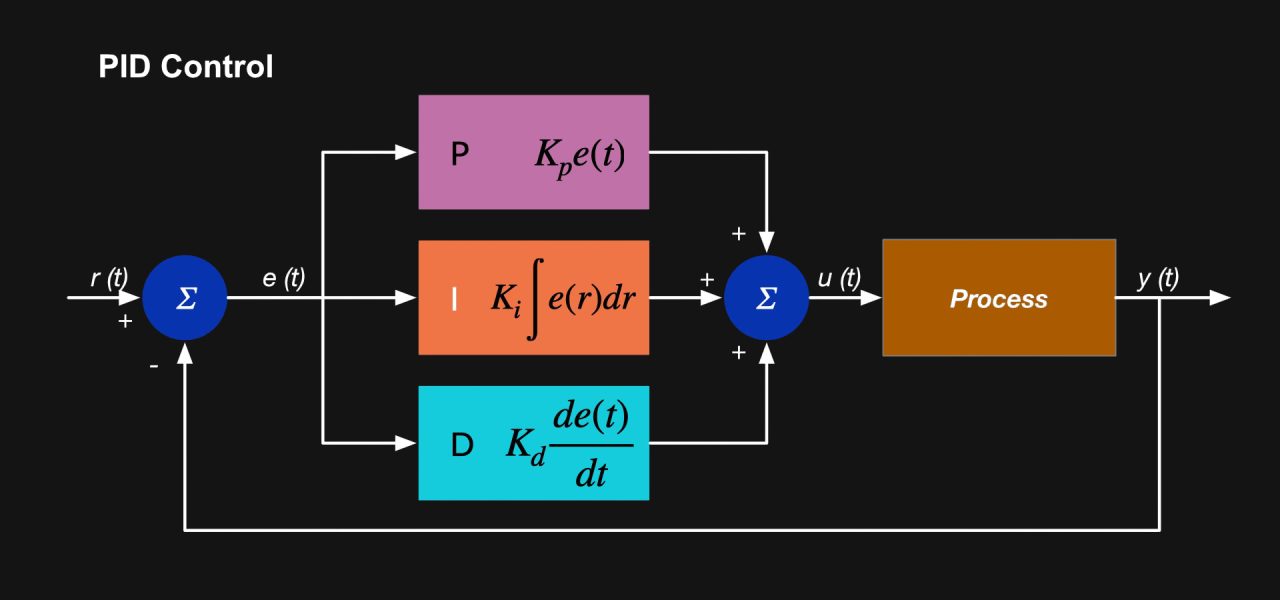
Radiators behave nothing like the smooth, proportional actuators that PID control expects. A typical UK radiator saturates at low valve openings (often around 20–30% travel), meaning it becomes fully hot and delivers its maximum heat output long before the valve is anywhere near fully open. Below this point, flow is too low for predictable heat delivery; above it, extra valve opening provides no additional heat. This creates a highly non‑linear, almost binary response: either the radiator is cold, or it is saturated.
For PID to work at all, the PID output would need to be mapped to valve position in a strongly inverse, non‑linear way: when the room is cold, the valve must open fully to drive the radiator rapidly to saturation; but as the room approaches target temperature, the valve position must collapse into a very narrow low‑flow band to avoid overshoot. In practice, this “realistic modulation zone” is so small and unpredictable that PID cannot meaningfully modulate heat output. Even a seemingly modest valve opening (e.g., 20–25%) can still saturate the radiator and cause overshoot when the room is close to it’s target temperature.
Because radiators deliver almost all their useful heat in the saturated state and provide no stable proportional response, simple on/off control with hysteresis is usually far more effective than PID for maintaining stable room temperatures.
Control Delegation
When a Shelly BLU TRV operates in its normal thermostatic mode, it decides for itself when to open or close the valve based on the temperature it senses. However, if you use it purely as a motorised valve, the TRV no longer makes those decisions. In that mode, Home Assistant becomes responsible for determining when the valve should open or close, using its own temperature readings and automation logic.
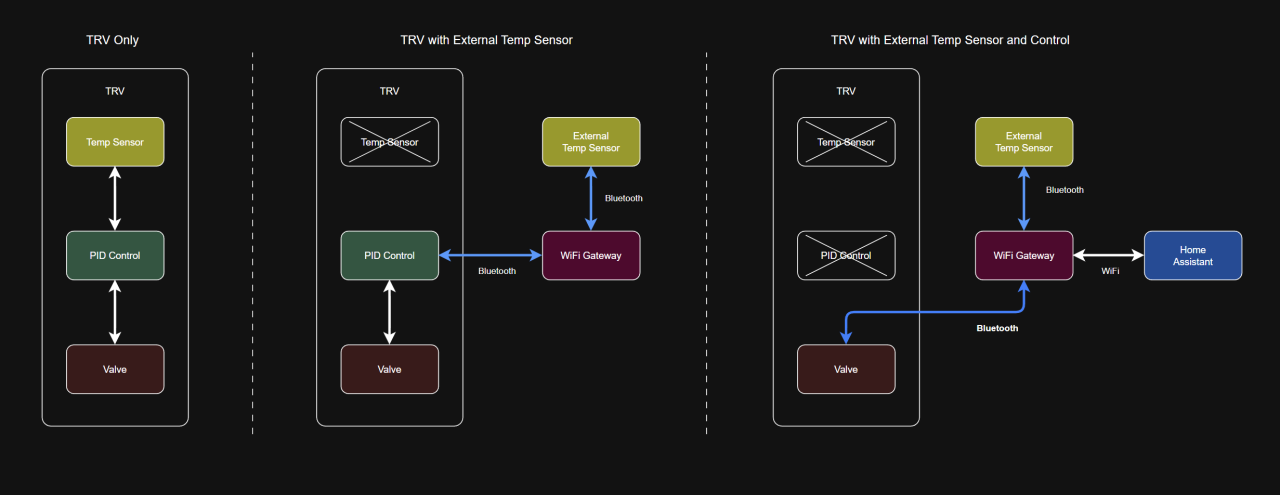
If Home Assistant takes over control of the valve, you need strong safeguards and reliable automations to keep the system within safe operating limits. Because Bluetooth becomes part of the control loop and isn’t always dependable, the setup also requires additional guardrails to ensure Home Assistant maintains a stable connection to the TRV.
Control Strategy
I have implemented a control system in Home Assistant where each room reports it’s temperature, which is compared against its target, and if the temperature has dropped below it’s pre-configured offset value, it demands heat.
When any room demands heat, the boiler is switched on, and when all rooms no longer demand heat the boiler is switched off.
The choice of where to place radiator valve control authority must balance the reliability of local, but inefficient TRV‑based PID control, against the accuracy of remote control via Home Assistant, which depends on a less reliable Bluetooth and WiFi connection.
Control Ownership
I am trialling a balanced approach in which the TRV retains full authority over valve actuation, while I externally set its target temperature. Room temperature is measured using a Shelly H&T sensor, which provides a more representative reading of the space than the TRV’s onboard sensor. Accuracy depends on placement, so sensor position must balance responsiveness with a realistic measurement of the room environment.
System Flow Protection
To prevent pump dead‑heading, two radiators remain permanently open: the bathroom towel rail and the lounge radiator, which cannot accept a TRV. These provide a guaranteed minimum flow path regardless of individual room demand
Temperature Hysteresis
The TRV’s target temperature is set via Home Assistant, and boiler firing is controlled using the following logic:
- Turn ON: If ANY rooms target temperature falls to more than 0.5°C below the TRV target temperature
- Turn OFF: If ALL rooms temperatures are above their TRV target temperatures
This creates a global 0.5°C hysteresis band, implemented using a numeric helper for easy adjustment. A secondary, natural hysteresis arises from the delay between the radiator warming the room and the Shelly H&T registering that rise. Sensor placement can influence this effect, but must not compromise accurate room‑level measurement.
This strategy inevitably introduces some overshoot and undershoot, but these can be moderated through lockshield balancing, the hysteresis band, and the boiler’s flow‑temperature setting.
The Grafana chart below shows the hysteresis, and considering humans respond more to the presence or absence of a heat source than to small temperature changes, the 1-2°C itself is not noticeable. What is noticeable is if the radiator is on or not. Because radiant heat dominates perception, you may feel warmer in a room that is actually 1 °C colder if the radiator is on.
This chart highlights the inefficient use of battery energy and excessive noise and wear and tear created by the PID controller:
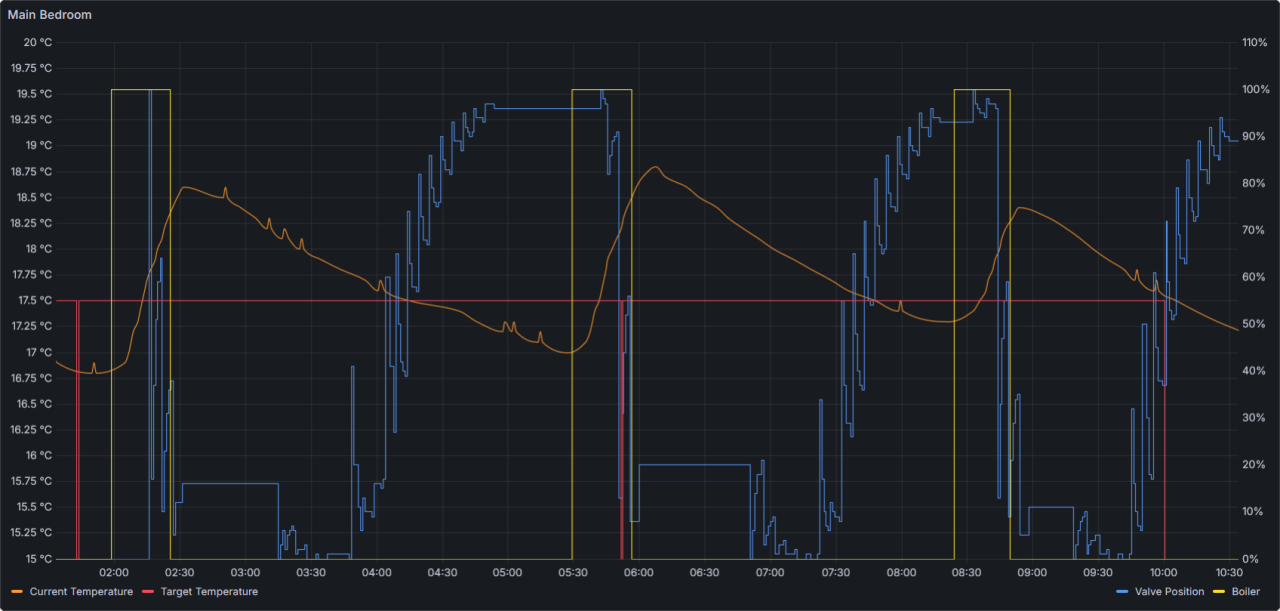
Given most of the flow occurs around 30% of the valve opening (assuming a non-linear valve), all of the activity above that is wasted.
Short-Cycling Prevention
With a control strategy that allows each room to request heat independently, it’s possible for one room to stop demanding heat only for another to request it moments later. To prevent rapid cycling of the boiler in these situations, I have implemented a boiler lockout timer. While the timer is active, the boiler cannot be switched on or off, and any request to change state activates the timer.
TRV Installation & Configuration
Installation
Installation is relatively straightforward. After removing the battery‑saver tabs, it’s simply a case of taking off the existing TRV, screwing the new base onto the valve’s threaded pipe, and then clipping the TRV onto the base. You then rotate it clockwise to lock it in place. This part can be a little fiddly, as you need to hold the stationary section of the TRV – most of the body rotates to set the temperature.
Standard Home Assistant Configuration
I have a Raspberry PI Server with Home Assitant, which I use for Home Automation. Adding devices is normally straightforward, as Shelly devices are automatically detected if you have the integration installed. if not it is a relatively easy operation to ad them manually using IP address.
TRVs are not as straightforward as they communicate over Bluetooth and rely on dedicated Wi‑Fi gateways. While a single gateway can handle multiple TRVs, most rooms only have one radiator, and for reliable Bluetooth reception each room ideally needs its own gateway.
Configuration is done through the web interface exposed by the gateway’s Wi‑Fi access‑point connection. I use static IP addresses outside of my DHCP range for all of my home automation devices. Then as standard on Shelly devices, update the firmware and modify the settings, device name etc.
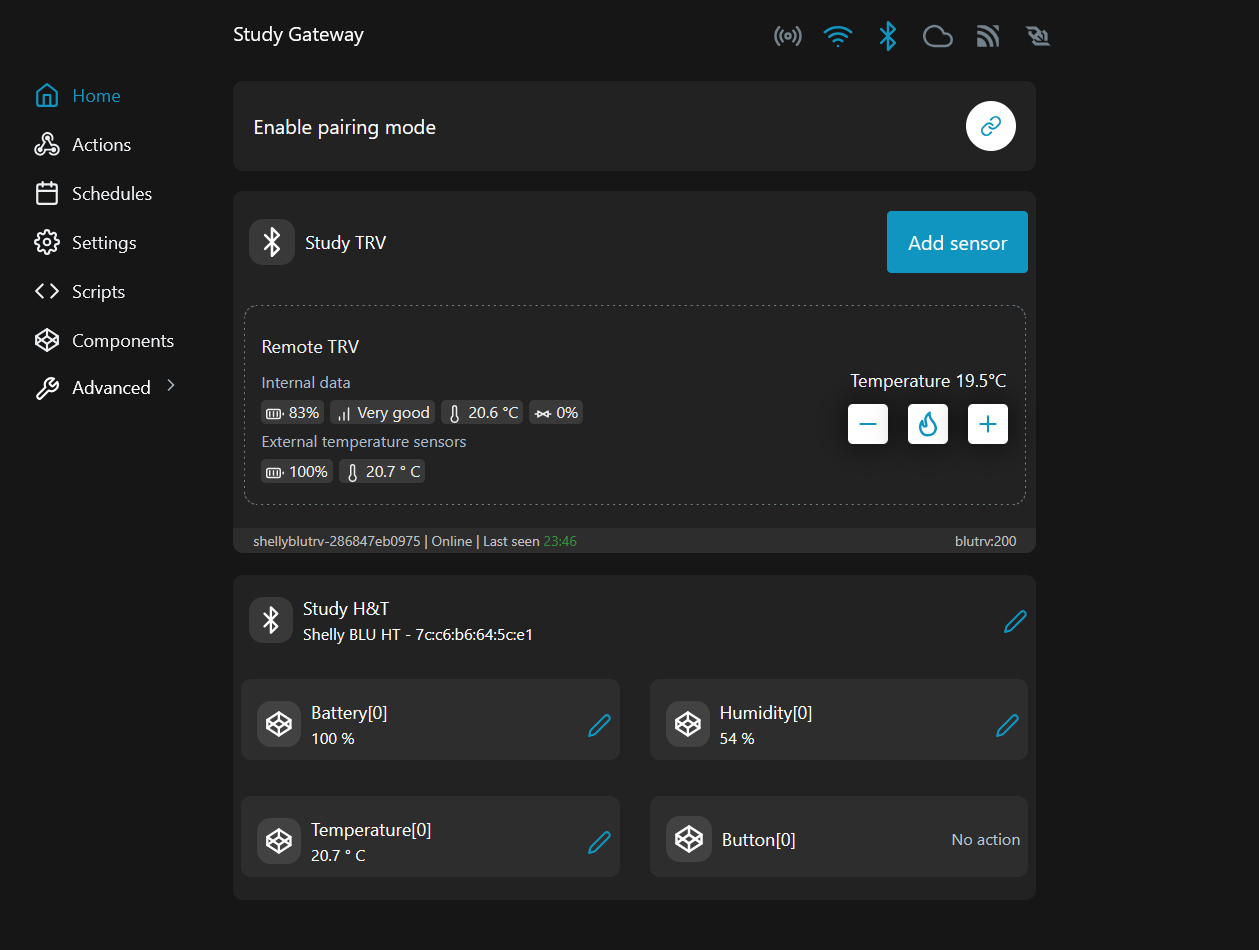
After you have the gateway configured, you have to mount the TRVs and remove the shipping battery tab, after which they will calibrate themselves. Pairing is best done via the web interface, and once paired you will have access to the TRV settings.
Once the gateway is on the network, Home Assistant discovers it, and if the TRVs have been paired, they’re detected and added alongside it.
The Shelly TRVs have built-in temperature sensors, but given that they are close to the radiator, I chose to add external sensors, which the gateway and TRV supports. This allows for more accurate room temperature monitoring, although it could have drawbacks depending on how you plan to control the TRVs. A built-in sensor will react quicker to the change in temperature, as opposed to a sensor across the room.
Extended Home Assistant Configuration
The implementation of the Shelly BLU TRV in Home Assistant is basic and gives you access to basic thermostat controls, but no additional sensors:
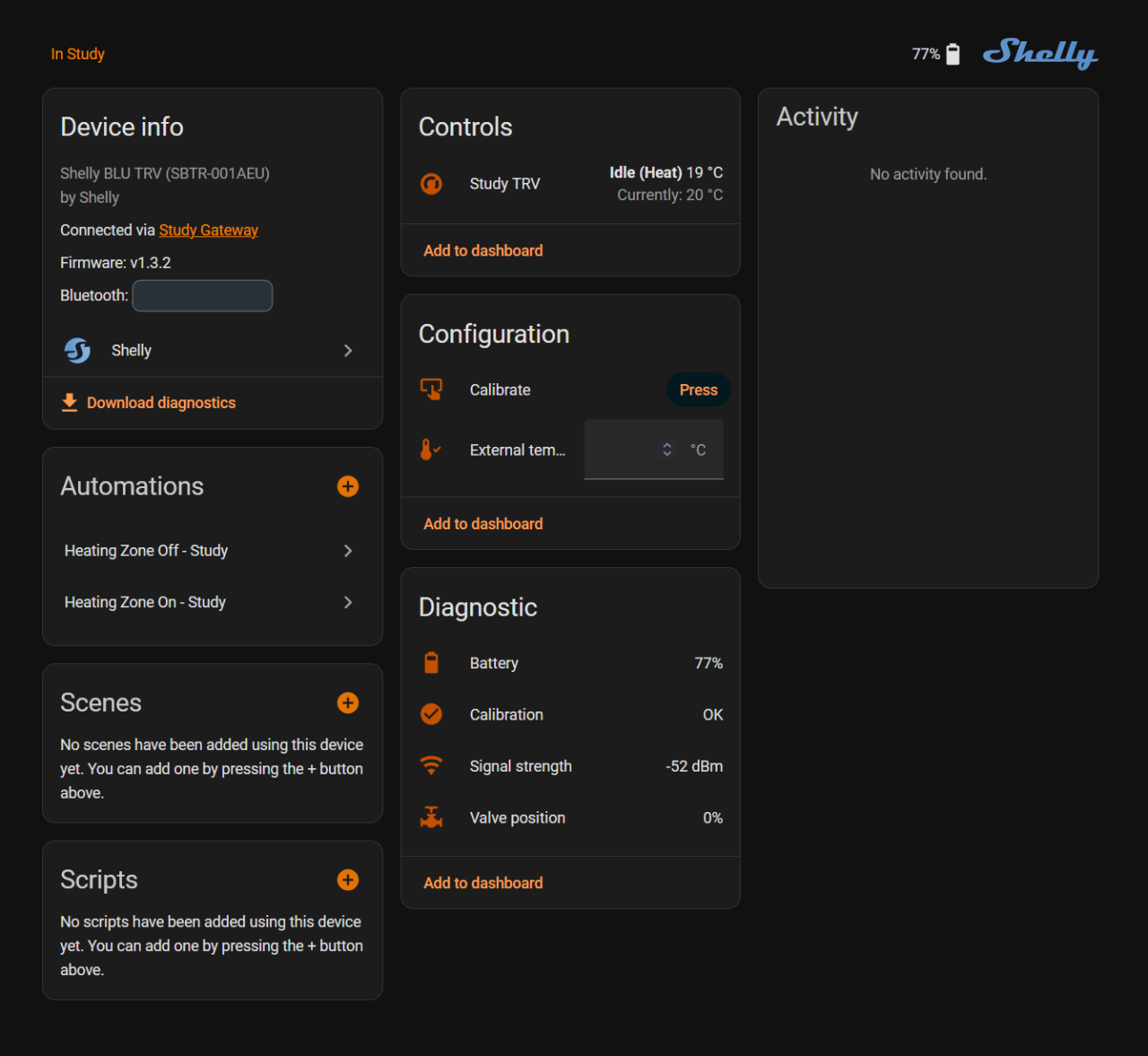
You can view the current temperature and adjust the target temperature using the thermostatic control, but there are no additional features such as a boost mode:
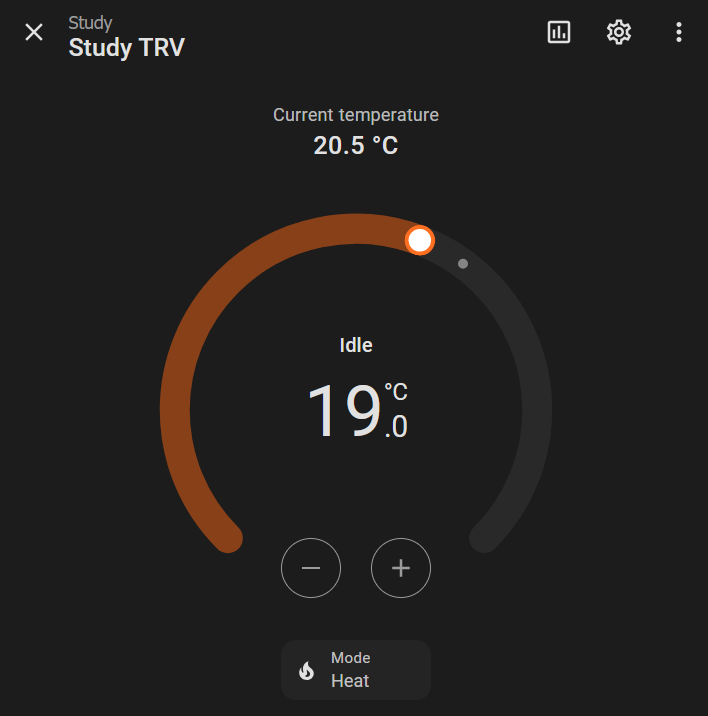
To add boost capability and expose controls on dashboards, I surfaced additional sensors by adding some YAML to my configuration.yaml file.
First I used the REST RPC API to retrieve all values from the TRVs:
sensor:
# Fetchers for TRV Status
- platform: rest
name: "TRV Status - Dining Room"
unique_id: trv_status_dining_room
resource: "http://192.168.1.XXX/rpc/BluTrv.Call?id=200&method=TRV.GetStatus¶ms={\"id\":0}"
method: GET
scan_interval: 10
value_template: "{{ value_json.id }}"
json_attributes:
- pos
- steps
- current_C
- target_C
- boost
- schedule_rev
- errors
Then I created sensors based on the returned data. I created both ‘native’ and ‘numeric’ versions: the numeric variants ensure that if a value is reported as unknown or unavailable, I still receive a valid number. As mentioned above, I use 999 for the current temperature and 0 for the target temperature so that any comparisons never incorrectly generate heat demand when one of the values is missing.
template:
  - sensor:
      # Dining Room
      - name: "TRV Current Temperature - Dining Room"
        unique_id: trv_current_temperature_dining_room
        state: "{{ state_attr('sensor.trv_status_dining_room', 'current_C') }}"
        unit_of_measurement: "°C"

      - name: "TRV Current Temperature Numeric - Dining Room"
        unique_id: trv_current_temperature_numeric_dining_room
        state: "{{ state_attr('sensor.trv_status_dining_room', 'current_C') | float(999) }}"
        unit_of_measurement: "°C"

      - name: "TRV Target Temperature - Dining Room"
        unique_id: trv_target_temperature_dining_room
        state: "{{ state_attr('sensor.trv_status_dining_room', 'target_C') }}"
        unit_of_measurement: "°C"

      - name: "TRV Target Temperature Numeric - Dining Room"
        unique_id: trv_target_temperature_numeric_dining_room
        state: "{{ state_attr('sensor.trv_status_dining_room', 'target_C') | float(0) }}"
unit_of_measurement: "°C"The following REST commands activate or cancel the TRVs boost function, setting the time for the boost, based on a numeric helper that I use to set the boost time on my dashboard:
rest_command:
# Dining Room
trv_boost_dining_room:
url: "http://192.168.1.XXX/rpc/BluTrv.Call?id=200&method=TRV.SetBoost¶ms={\"id\":0,\"duration\":{{ states('input_number.boost_time_dining_room') | int * 60 }}}"
method: GET
trv_cancel_boost_dining_room:
url: "http://192.168.1.XX/rpc/BluTrv.Call?id=200&method=TRV.SetBoost¶ms={\"id\":0,\"duration\":0}"
method: GETThis binary sensor indicates the boost status:
template:
  - binary_sensor:
     - default_entity_id: binary_sensor.trv_boost_state_dining_room
       name: "TRV Boost State – Dining Room"
       unique_id: trv_boost_state_dining_room
state: "{{ state_attr('sensor.trv_status_dining_room', 'boost') is not none }}"This YAML defines buttons for use on a dashboard, each of which triggers its corresponding REST command:
template:
  - button:
    # Dining Room
    - name: "TRV Boost – Dining Room"
      unique_id: trv_boost_dining_room_button
      icon: mdi:fire
      press:
        - action: rest_command.trv_boost_dining_room

    - name: "TRV Stop Boost – Dining Room"
      unique_id: trv_stop_boost_dining_room_button
      icon: mdi:fire-off
      press:
- action: rest_command.trv_cancel_boost_dining_roomAutomation in Home Assistant
This is the difficult part. There are 3 things to consider:
- Determining when the boiler comes on based on the state of the TRVs and sensors
- Determining which rooms are heated and when
- Implementing fail-safe features to prevent short-cycling and dead-heading and to address communication failure
Boiler Demand
As I iterated through the development and testing cycles, I modified the automation and added additional safeguards and edge‑case handling. Below are some of the issues I came up against:
- PID control of the valve does not translate to an effective indicator of heat demand
- Sensor states such as
unknownorunavailable, often caused by restarts or communication dropouts, prevent reliable temperature comparison. - Missed triggers due to
unknownorunavailablestates - Boiler short-cycling
- Boiler not turning off after a reasonable period
My initial idea was to use the TRV state to determine when the boiler should turn on or off. The problem is that the TRV’s PID control created false demand. For example, once a room reaches its target temperature, the PID loop might close the valve to around 3%. Technically the TRV is still ‘calling for heat’, so it keeps the boiler running, but with the valve almost closed the radiator barely heats at all.
I ultimately chose to ignore the PID behaviour and valve position, and instead base boiler demand solely on the actual and target temperatures. This approach removes PID behaviour from the boiler control equation entirely.
To prevent short‑cycling, I introduced a hysteresis loop by applying an offset to the room temperature, so the boiler only fires once it falls a defined amount below the target. To do this I created a template helper that effectively reduces the room temperatures by an amount defined by a numeric helper:
{% set sbht = states('sensor.main_bedroom_sbht_temperature') %}
{% set offset = states('input_number.current_temperature_hysteresis_offset') | float %}
{% if sbht not in ['unknown', 'unavailable', None] %}
  {{ sbht | float + offset }}
{% else %}
  999
{% endif %}In this template, I return the room temperature with the hysteresis offset applied, typically around 0.5°C. If the temperature sensor reports an unknown, unavailable, or none state, which often happens after a Home Assistant restart or when the device briefly loses connection, the template outputs a value of 999. This ensures that when the actual temperature cannot be trusted, the automation will not trigger the boiler, because 999 acts as a deliberate ‘impossible’ fail‑safe value.
This value is then compared to the TRV target temperature. Since the target temperature can also be reported as unavailable or unknown, I convert it to 0 in those cases. This means that in every possible permutation of the comparison, if any value is not known for any reason, the automation will not trigger the boiler as a result of this check.
Missed triggers were also caused by situations where a value became unavailable. If a trigger relies on a room’s offset temperature dropping below its target temperature, and that moment is missed, the boiler will not turn on again as a result of that room needing heat. This is because the trigger depends on the transition from above target to below.
To ensure the boiler still activates when a room requires heat, I added a schedule trigger that runs every five minutes and evaluates each room on every cycle. This guarantees that the automation checks regularly whether any room’s offset temperature is below its target, and if so, it switches the boiler on
To prevent short‑cycling, I created a lockout‑timer helper. Whenever Home Assistant changes the boiler’s state, the timer starts its countdown, and any further attempts to change the boiler state are blocked while the timer is active
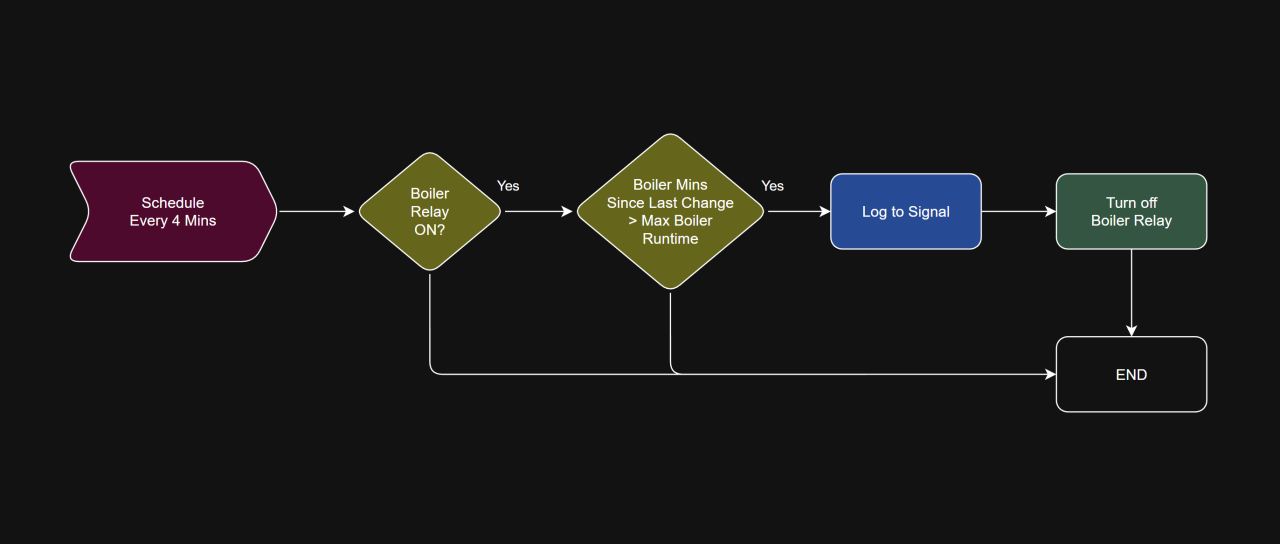
As a failsafe to ensure the boiler never remains on longer than intended, I added a watchdog automation that runs every four minutes. This interval avoids scheduling collisions with the five‑minute evaluation cycle. The watchdog checks how many minutes have passed since the last state change, and if that value exceeds a preset threshold, it forces the boiler off.
Because Home Assistant itself could become unavailable, I also configured an auto‑off timer on the Shelly Plus 1 relay as an additional layer of protection.
I ended up consolidating everything into a single automation for boiler demand. There’s enough overlap and shared triggers that keeping it all together made the most sense.
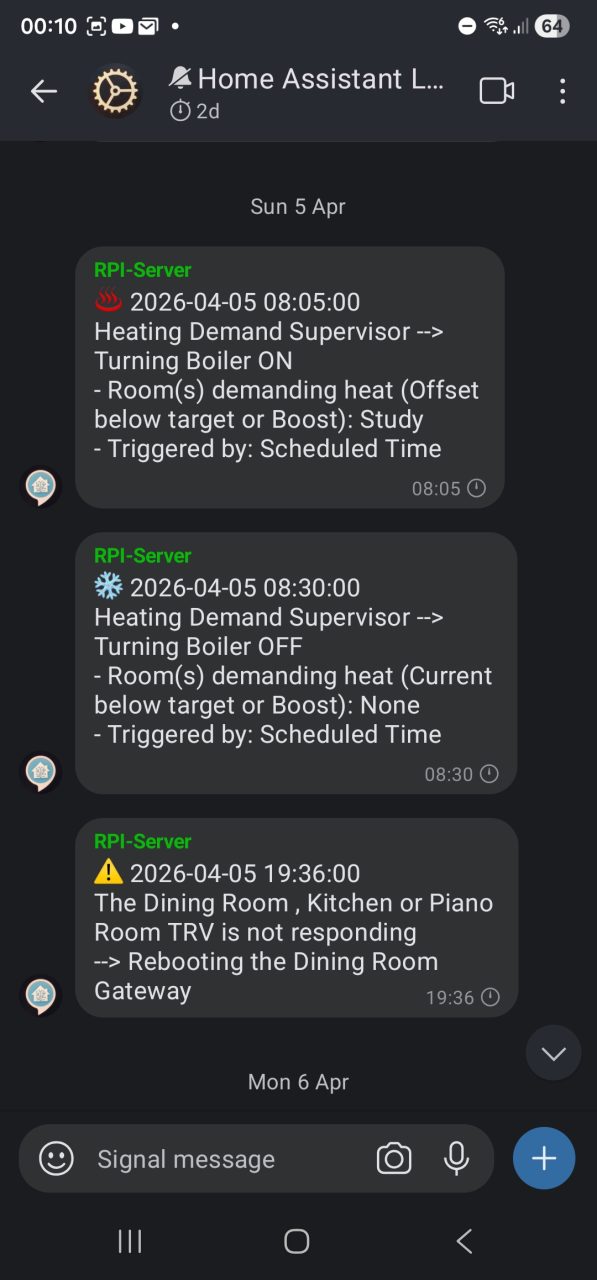
Signal Notifications: I don’t intend to use Home Assistant outside of my home so have not opened any ports on my router. However, I still wanted a way to receive notifications. I discovered that Signal can be used to send and receive notifications for free – see my Home Automation page for more details. I have 3 Signal groups:
- Notifications: Unmuted – for events I want to be notified about immediately
- Logs: Muted – For recording events I am interested in tracking but do not need to notified about
- Debug: Muted – Used for debugging while developing automations.
The screenshot below shows the Signal messages, and the YAML beneath it defines how they are created and formatted
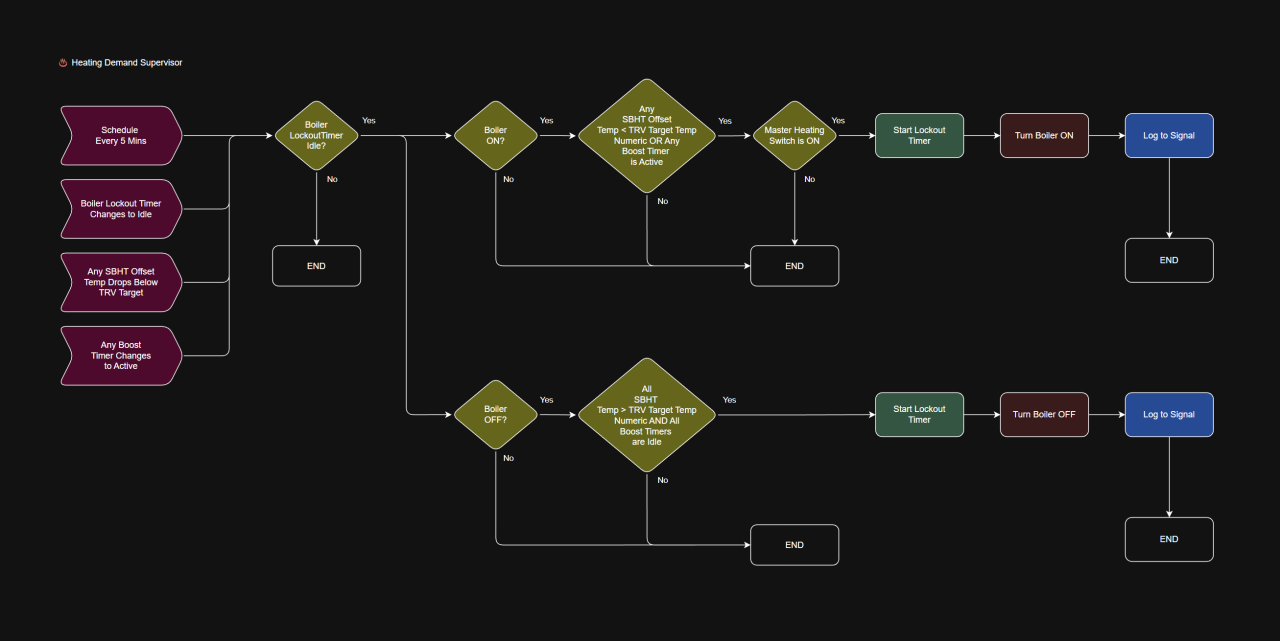
Flowchart of the Heating Demand Supervisor automation:
The screenshot below shows the Home Assistant automation, but the triggers have been condensed into a single row for clarity. Home Assistant does not currently support displaying triggers this way; it has been formatted like this purely to keep the screenshot compact:
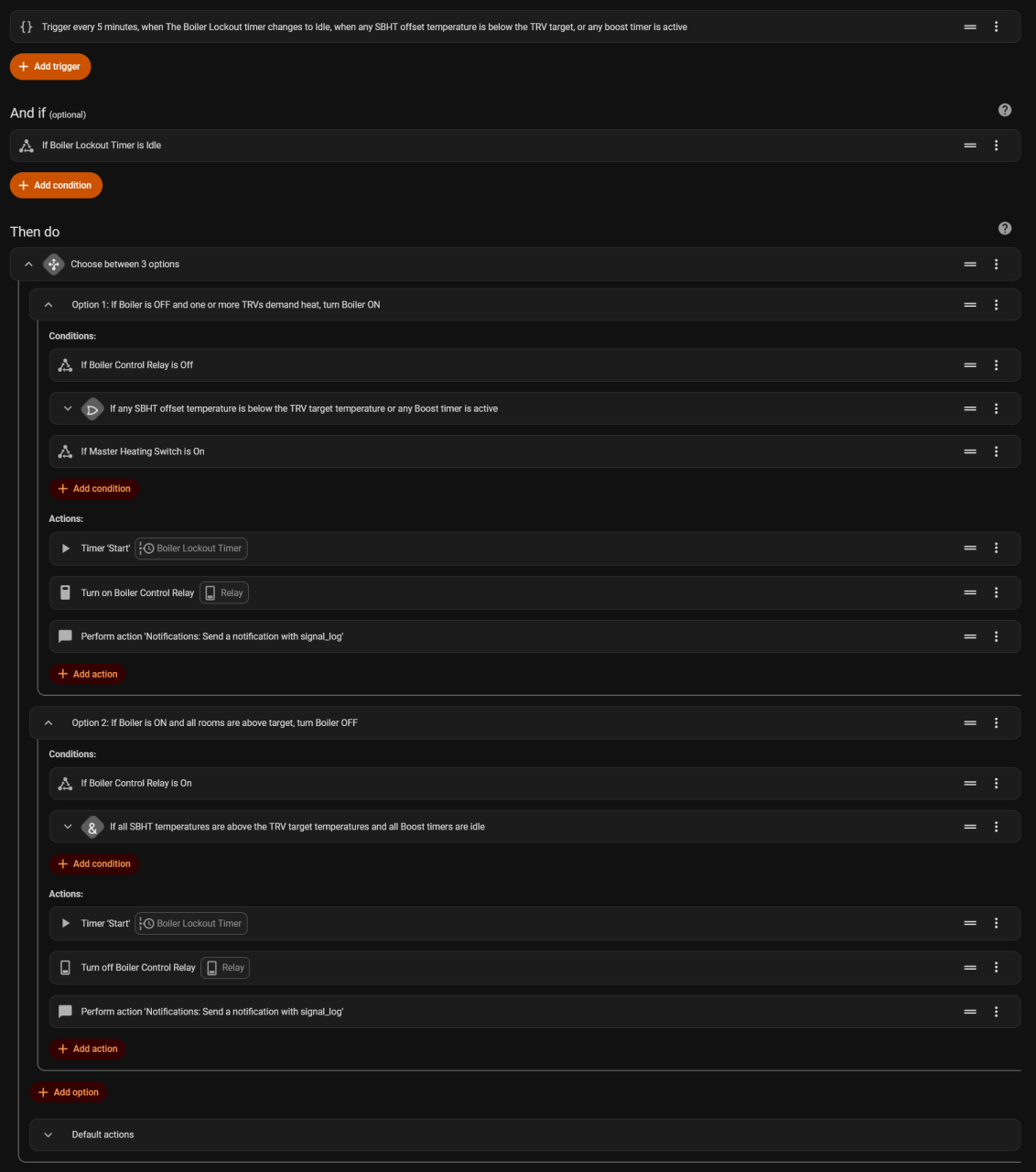
The YAML definition of the automation:
alias: ♨️ Heating Demand Supervisor
description: ""
triggers:
- trigger: state
entity_id:
- timer.boiler_lockout_timer
to:
- idle
id: Boiler Lockout Timer
- trigger: time_pattern
minutes: /5
id: Scheduled Time
- trigger: numeric_state
entity_id:
- sensor.current_sbht_temperature_offset_dining_room
below: sensor.trv_target_temperature_numeric_dining_room
id: Dining Room Temperature (Dining Room TRV)
- trigger: numeric_state
entity_id:
- sensor.current_sbht_temperature_offset_dining_room
below: sensor.trv_target_temperature_numeric_kitchen
id: Dining Room Temperature (Kitchen TRV)
- trigger: numeric_state
entity_id:
- sensor.current_sbht_temperature_offset_dining_room
below: sensor.trv_target_temperature_numeric_piano_room
id: Dining Room Temperature (Piano Room TRV)
- trigger: numeric_state
entity_id:
- sensor.current_sbht_temperature_offset_study
below: sensor.trv_target_temperature_numeric_study
id: Study Temperature
- trigger: numeric_state
entity_id:
- sensor.current_sbht_temperature_offset_main_bedroom
below: sensor.trv_target_temperature_numeric_main_bedroom
id: Main Bedroom Temperature
- trigger: numeric_state
entity_id:
- sensor.current_sbht_temperature_offset_child2s_bedroom
below: sensor.trv_current_temperature_numeric_child2s_bedroom
id: Child 2's Bedroom Temperature
- trigger: numeric_state
entity_id:
- sensor.current_sbht_temperature_offset_exercise_room
below: sensor.trv_current_temperature_numeric_exercise_room
id: Child 2's Bedroom Temperature
- trigger: state
entity_id:
- timer.boost_timer_dining_room
to:
- active
id: Boost Timer - Dining Room
- trigger: state
entity_id:
- timer.boost_timer_study
to:
- active
id: Boost Timer - Study
- trigger: state
entity_id:
- timer.boost_timer_main_bedroom
to:
- active
id: Boost Timer - Main Bedroom
- trigger: state
entity_id:
- timer.boost_timer_child2s_bedroom
to:
- active
id: Boost Timer - Child 2's Bedroom
- trigger: state
entity_id:
- timer.boost_timer_exercise_room
to:
- active
id: Boost Timer - Exercise Room
conditions:
- condition: state
entity_id: timer.boiler_lockout_timer
state:
- idle
actions:
- choose:
- conditions:
- condition: state
entity_id: switch.boiler_control_relay
state:
- "off"
- condition: or
conditions:
- condition: numeric_state
entity_id: sensor.current_sbht_temperature_offset_dining_room
below: sensor.trv_target_temperature_numeric_dining_room
- condition: numeric_state
entity_id: sensor.current_sbht_temperature_offset_dining_room
below: sensor.trv_target_temperature_numeric_kitchen
- condition: numeric_state
entity_id: sensor.current_sbht_temperature_offset_dining_room
below: sensor.trv_target_temperature_numeric_piano_room
- condition: numeric_state
entity_id: sensor.current_sbht_temperature_offset_study
below: sensor.trv_target_temperature_numeric_study
- condition: numeric_state
entity_id: sensor.current_sbht_temperature_offset_main_bedroom
below: sensor.trv_target_temperature_numeric_main_bedroom
- condition: numeric_state
entity_id: sensor.current_sbht_temperature_offset_child2s_bedroom
below: sensor.trv_target_temperature_numeric_child2s_bedroom
- condition: numeric_state
entity_id: sensor.current_sbht_temperature_offset_exercise_room
below: sensor.trv_target_temperature_numeric_exercise_room
- condition: state
entity_id: timer.boost_timer_dining_room
state:
- active
- condition: state
entity_id: timer.boost_timer_study
state:
- active
- condition: state
entity_id: timer.boost_timer_main_bedroom
state:
- active
- condition: state
entity_id: timer.boost_timer_child2s_bedroom
state:
- active
- condition: state
entity_id: timer.boost_timer_exercise_room
state:
- active
alias: >-
If any SBHT offset temperature is below the TRV target temperature
or any Boost timer is active
- condition: state
entity_id: input_boolean.master_heating_switch
state:
- "on"
sequence:
- action: timer.start
metadata: {}
target:
entity_id: timer.boiler_lockout_timer
data: {}
- action: switch.turn_on
metadata: {}
data: {}
enabled: true
target:
entity_id: switch.boiler_control_relay
alias: Turn on Boiler Control Relay
- action: notify.signal_log
data:
message: >-
{% set rooms = [
{
'name': 'Dining Room',
'below': states('sensor.current_sbht_temperature_offset_dining_room') | float
< states('sensor.trv_target_temperature_numeric_dining_room') | float
},
{
'name': 'Kitchen',
'below': states('sensor.current_sbht_temperature_offset_dining_room') | float
< states('sensor.trv_target_temperature_numeric_kitchen') | float
},
{
'name': 'Piano Room',
'below': states('sensor.current_sbht_temperature_offset_dining_room') | float
< states('sensor.trv_target_temperature_numeric_piano_room') | float
},
{
'name': 'Study',
'below': states('sensor.current_sbht_temperature_offset_study') | float
< states('sensor.trv_target_temperature_numeric_study') | float
},
{
'name': 'Main Bedroom',
'below': states('sensor.current_sbht_temperature_offset_main_bedroom') | float
< states('sensor.trv_target_temperature_numeric_main_bedroom') | float
},
{
'name': "Child 2's Bedroom",
'below': states('sensor.current_sbht_temperature_offset_child2s_bedroom') | float
< states('sensor.trv_current_temperature_numeric_child2s_bedroom') | float
},
{
'name': 'Exercise Room',
'below': states('sensor.current_sbht_temperature_offset_exercise_room') | float
< states('sensor.trv_target_temperature_numeric_exercise_room') | float
},
{
'name': 'Dining Room (Boost)',
'below': is_state('timer.boost_timer_dining_room', 'active')
},
{
'name': 'Study (Boost)',
'below': is_state('timer.boost_timer_study', 'active')
},
{
'name': 'Main Bedroom (Boost)',
'below': is_state('timer.boost_timer_main_bedroom', 'active')
},
{
'name': "Child 2's Bedroom (Boost)",
'below': is_state('timer.boost_timer_child2s_bedroom', 'active')
},
{
'name': 'Exercise Room (Boost)',
'below': is_state('timer.boost_timer_exercise_room', 'active')
}
] %}
{% set below = rooms | selectattr('below') |
map(attribute='name') | list %}
♨️ {{ now().strftime('%Y-%m-%d %H:%M:%S') }}
Heating Demand Supervisor --> Turning Boiler ON
- Room(s) demanding heat (Offset below target or Boost): {{
below | join(', ') if below | length > 0 else 'None' }}
- Triggered by: {{ trigger.id }}
alias: If Boiler is OFF and one or more TRVs demand heat, turn Boiler ON
- conditions:
- condition: state
entity_id: switch.boiler_control_relay
state:
- "on"
- condition: and
conditions:
- condition: numeric_state
entity_id: sensor.current_sbht_temperature_dining_room
above: sensor.trv_target_temperature_numeric_dining_room
- condition: numeric_state
entity_id: sensor.current_sbht_temperature_dining_room
above: sensor.trv_target_temperature_numeric_kitchen
- condition: numeric_state
entity_id: sensor.current_sbht_temperature_dining_room
above: sensor.trv_target_temperature_numeric_piano_room
- condition: numeric_state
entity_id: sensor.current_sbht_temperature_study
above: sensor.trv_target_temperature_numeric_study
- condition: numeric_state
entity_id: sensor.current_sbht_temperature_main_bedroom
above: sensor.trv_target_temperature_numeric_main_bedroom
- condition: numeric_state
entity_id: sensor.current_sbht_temperature_child2s_bedroom
above: sensor.trv_target_temperature_numeric_child2s_bedroom
- condition: numeric_state
entity_id: sensor.current_sbht_temperature_exercise_room
above: sensor.trv_target_temperature_numeric_exercise_room
- condition: state
entity_id: timer.boost_timer_dining_room
state:
- idle
- condition: state
entity_id: timer.boost_timer_study
state:
- idle
- condition: state
entity_id: timer.boost_timer_main_bedroom
state:
- idle
- condition: state
entity_id: timer.boost_timer_child2s_bedroom
state:
- idle
- condition: state
entity_id: timer.boost_timer_exercise_room
state:
- idle
alias: >-
If all SBHT temperatures are above the TRV target temperatures and
all Boost timers are idle
sequence:
- action: timer.start
metadata: {}
target:
entity_id: timer.boiler_lockout_timer
data: {}
- action: switch.turn_off
metadata: {}
data: {}
enabled: true
target:
entity_id: switch.boiler_control_relay
alias: Turn off Boiler Control Relay
- action: notify.signal_log
data:
message: >-
{% set rooms = [
{
'name': 'Dining Room',
'below': states('sensor.current_sbht_temperature_dining_room') | float
< states('sensor.trv_target_temperature_numeric_dining_room') | float
},
{
'name': 'Kitchen',
'below': states('sensor.current_sbht_temperature_dining_room') | float
< states('sensor.trv_target_temperature_numeric_kitchen') | float
},
{
'name': 'Piano Room',
'below': states('sensor.current_sbht_temperature_dining_room') | float
< states('sensor.trv_target_temperature_numeric_piano_room') | float
},
{
'name': 'Study',
'below': states('sensor.current_sbht_temperature_study') | float
< states('sensor.trv_target_temperature_numeric_study') | float
},
{
'name': 'Main Bedroom',
'below': states('sensor.current_sbht_temperature_main_bedroom') | float
< states('sensor.trv_target_temperature_numeric_main_bedroom') | float
},
{
'name': "Child 2's Bedroom",
'below': states('sensor.current_sbht_temperature_child2s_bedroom') | float
< states('sensor.trv_current_temperature_numeric_child2s_bedroom') | float
},
{
'name': 'Exercise Room',
'below': states('sensor.current_sbht_temperature_exercise_room') | float
< states('sensor.trv_target_temperature_numeric_exercise_room') | float
},
{
'name': 'Dining Room (Boost)',
'below': is_state('timer.boost_timer_dining_room', 'active')
},
{
'name': 'Study (Boost)',
'below': is_state('timer.boost_timer_study', 'active')
},
{
'name': 'Main Bedroom (Boost)',
'below': is_state('timer.boost_timer_main_bedroom', 'active')
},
{
'name': "Child 2's Bedroom (Boost)",
'below': is_state('timer.boost_timer_child2s_bedroom', 'active')
},
{
'name': 'Exercise Room (Boost)',
'below': is_state('timer.boost_timer_exercise_room', 'active')
}
] %}
{% set below = rooms | selectattr('below') |
map(attribute='name') | list %}
❄️ {{ now().strftime('%Y-%m-%d %H:%M:%S') }}
Heating Demand Supervisor --> Turning Boiler OFF
- Room(s) demanding heat (Current below target or Boost): {{
below | join(', ') if below | length > 0 else 'None' }}
- Triggered by: {{ trigger.id }}
alias: If Boiler is ON and all rooms are above target, turn Boiler OFF
default:
- action: notify.signal_debug
data:
message: >-
{% set rooms = [
{
'name': 'Dining Room',
'below': states('sensor.current_sbht_temperature_dining_room') | float
< states('sensor.trv_target_temperature_numeric_dining_room') | float
},
{
'name': 'Kitchen',
'below': states('sensor.current_sbht_temperature_dining_room') | float
< states('sensor.trv_target_temperature_numeric_kitchen') | float
},
{
'name': 'Piano Room',
'below': states('sensor.current_sbht_temperature_dining_room') | float
< states('sensor.trv_target_temperature_numeric_piano_room') | float
},
{
'name': 'Study',
'below': states('sensor.current_sbht_temperature_study') | float
< states('sensor.trv_target_temperature_numeric_study') | float
},
{
'name': 'Main Bedroom',
'below': states('sensor.current_sbht_temperature_main_bedroom') | float
< states('sensor.trv_target_temperature_numeric_main_bedroom') | float
},
{
'name': "Child 2's Bedroom",
'below': states('sensor.current_sbht_temperature_child2s_bedroom') | float
< states('sensor.trv_current_temperature_numeric_child2s_bedroom') | float
},
{
'name': 'Exercise Room',
'below': states('sensor.current_sbht_temperature_exercise_room') | float
< states('sensor.trv_target_temperature_numeric_exercise_room') | float
},
{
'name': 'Dining Room (Boost)',
'below': is_state('timer.boost_timer_dining_room', 'active')
},
{
'name': 'Study (Boost)',
'below': is_state('timer.boost_timer_study', 'active')
},
{
'name': 'Main Bedroom (Boost)',
'below': is_state('timer.boost_timer_main_bedroom', 'active')
},
{
'name': "Child 2's Bedroom (Boost)",
'below': is_state('timer.boost_timer_child2s_bedroom', 'active')
},
{
'name': 'Exercise Room (Boost)',
'below': is_state('timer.boost_timer_exercise_room', 'active')
}
] %}
{% set below = rooms | selectattr('below') | map(attribute='name') |
list %}
♨️❄️ {{ now().strftime('%Y-%m-%d %H:%M:%S') }}
Heating Demand Supervisor --> No Action
- Room(s) demanding heat (Current below target or Boost): {{ below |
join(', ') if below | length > 0 else 'None' }}
- Triggered by: {{ trigger.id }}
enabled: false
mode: single
Boost Function
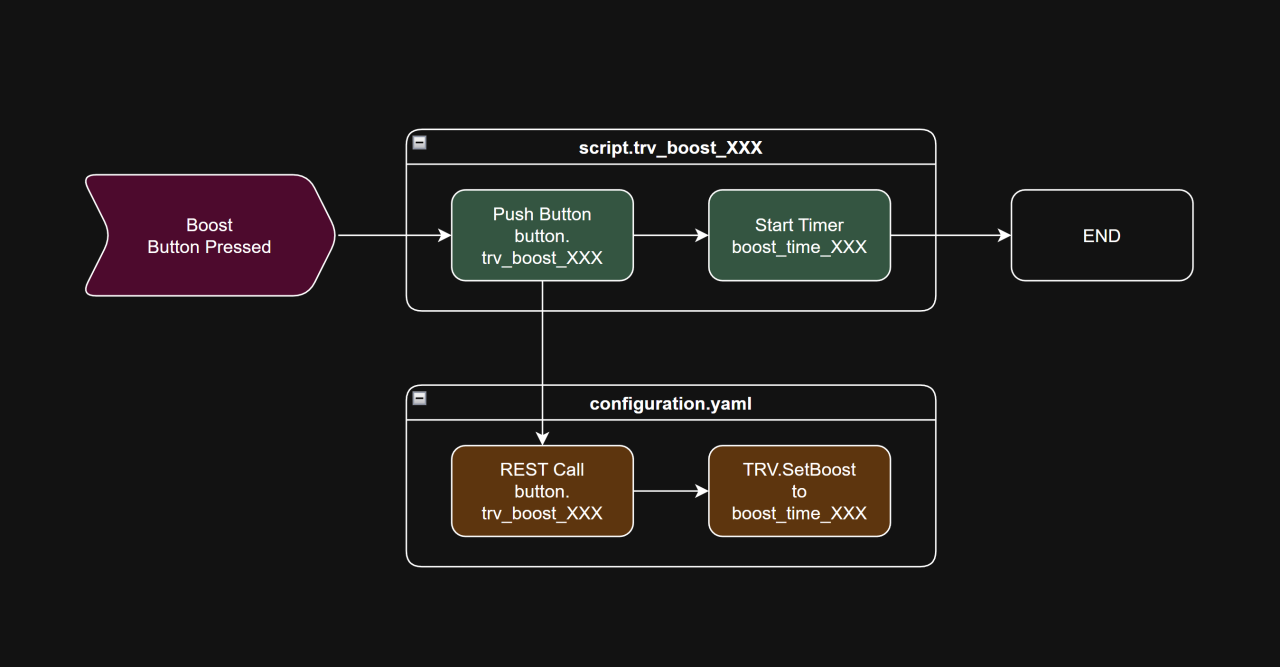
The boost feature is set up as two separate scripts for each room or group: one to start the boost and one to cancel it. I use a Mushroom Template card for the Start Boost button, and a tile card linked to the boost timer for the Stop Boost button so it can show the remaining time. The card’s state controls which one is visible — the start button appears when the boost is inactive, and the stop button appears when the boost is running, along with the countdown.
Room Zone Scheduling
This part was fairly straightforward. I created schedule helpers for each zone, allowing on/off times to be defined independently. I then added automations for each zone: When the schedule switched on, the zone’s TRV’s target temperature was set to the value defined by a numeric Target Temperature helper. When the schedule switched off, the zone’s TRVs were set to a global ‘off‑minimum’ value (e.g., 10 °C).
Watchdog Automations
I run a Boiler Watchdog automation every four minutes so it doesn’t overlap with the Heating Demand Supervisor. It checks whether the boiler is on and whether the number of minutes since the last state change exceeds a configurable numeric helper. If both conditions are true, it turns the boiler off:
The template sensor helper:
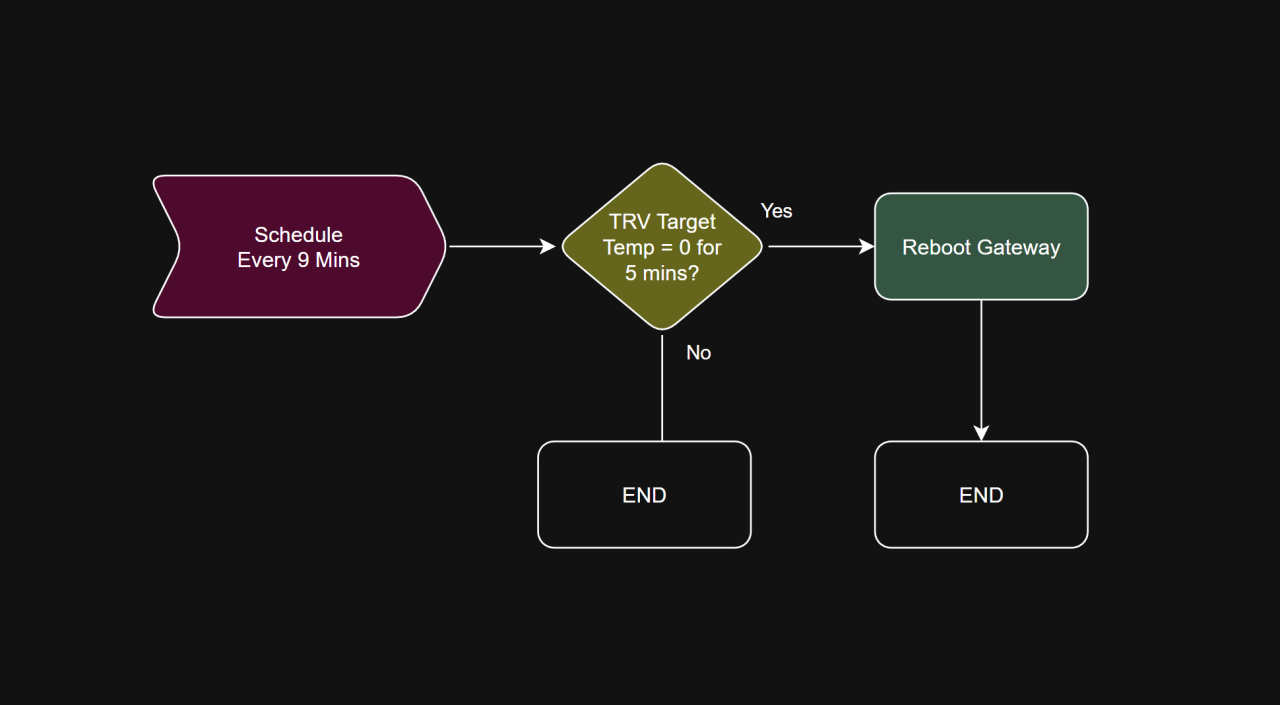
{{ ((now() - states.switch.boiler_control_relay.last_changed).total_seconds() / 60) | round(0) }}I have another watchdog that runs every 9 minutes that checks whether Home Assistant is receiving state updates from each TRV, and if not it reboots the relevant gateway device. It does this by checking whether the numeric target temperature (defined in configuration.yaml – shown above) has remained at 0 for more than five minutes. This is because if the TRV state becomes unknown or unavailable, the numeric value resolves to 0.
Dashboards
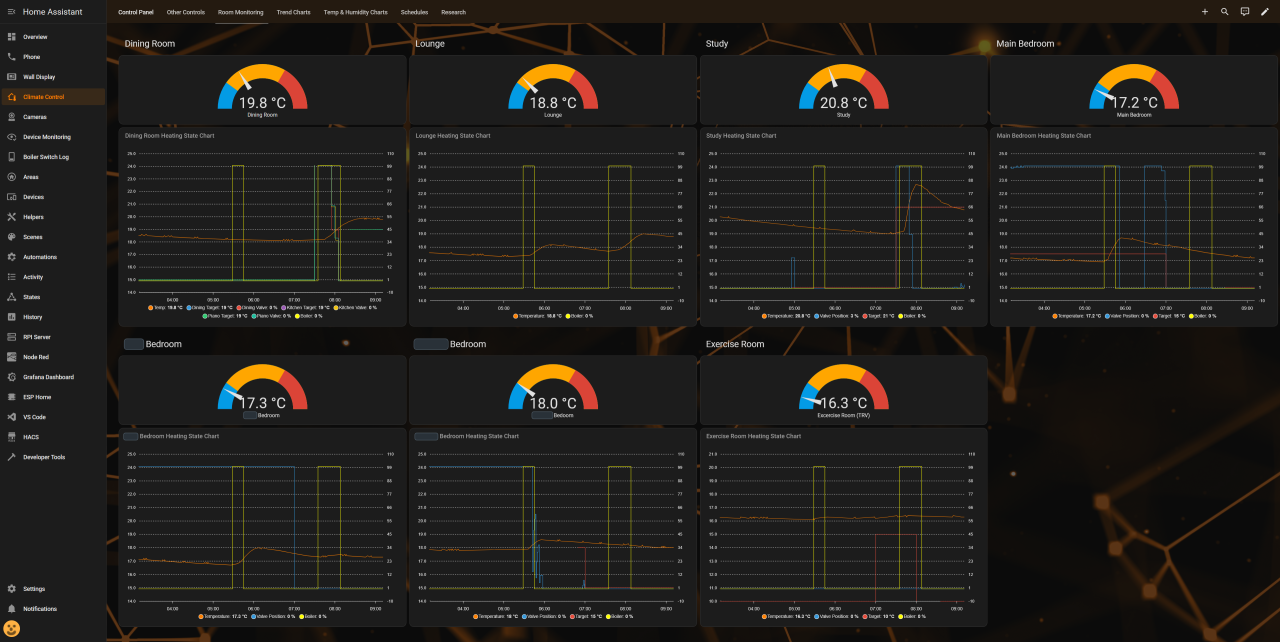
I have a number of dashboards configured specifically for heating control. The main dashboard gives me access to the RVs and additional functionality, such as setting the scheduled ‘on’ temperature and boost function, which I have had to implement myself.
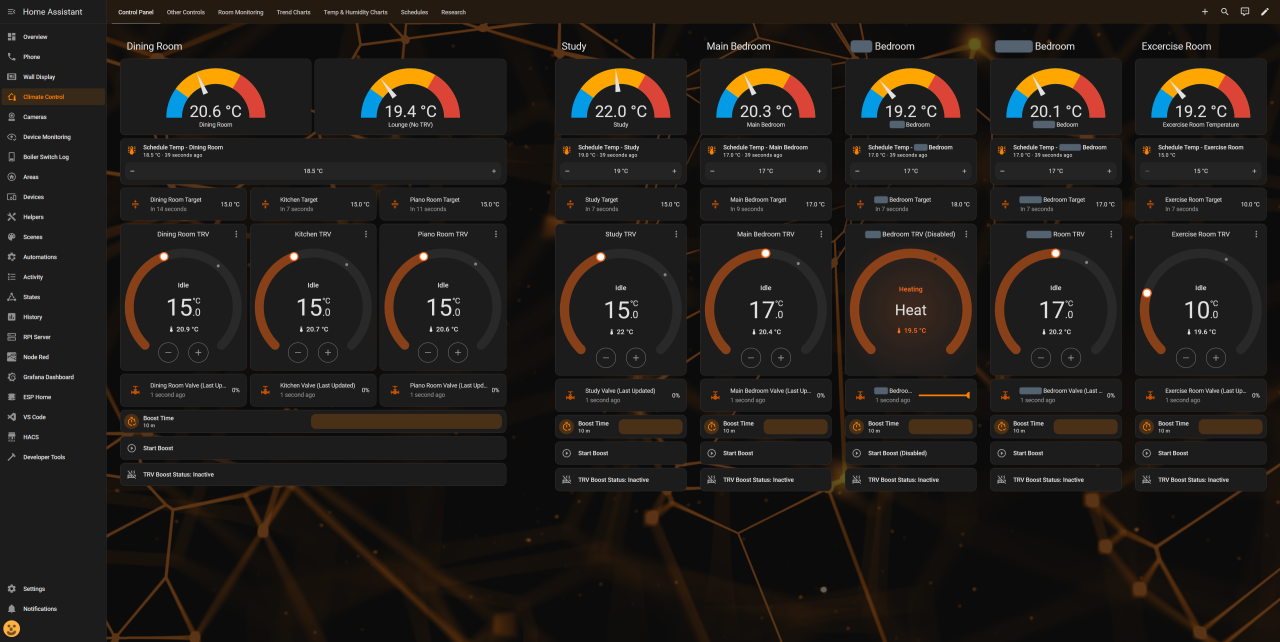
The remaining dashboards are mostly for observability. Being able to examine various aspects of the heating control system is critical and helps validate that the system is operating withing expected parameters, and helps answer questions from my wife, such as ‘Why is the boiler on – it’s hot in here!’ 😄
Final Note
Note: The approach I’ve implemented (using the TRVs’ PID control) may not be the optimal long‑term solution. As I test it, I’m increasingly convinced that treating the TRVs as remote‑controlled valves is the better strategy, for several reasons:
- It would eliminate PID‑driven oscillation, reducing battery usage and mechanical wear
- The valve would open and close only when heat is actually required
- I could modulate valve opening as needed, and combining that with adjusting the hysteresis temperature offset, I can choose between a smooth or more aggressive heating response
The drawback is that I would dependent on the Wi‑Fi → Bluetooth link for TRV valve control via Home Assistant, which could result in a room drifting too warm or too cold.
Leave a Reply